


Call Recorder Pro
3.5146.00 Reviews
App Specs
- Version
- 5.71
- Updated On
- License
- Free
- Downloads
- 1,000,000+
- Developer
- MARGOAPPS LLC
- Categories
- Communication
- Platform
- Android
Screenshots
 Analysis by AppCompare
Ever found yourself wishing you could just hit a button and record a phone call? Well, let me introduce you to Call Recorder Pro. I’ve been playing around with this app for a bit, and let me tell you, it’s a game-changer for those of us who need to keep track of our conversations, be it for work or personal reasons.
Before relying on a recording
My strongest practical advice is to treat a call recording as a backup for your own memory, not as a substitute for clear notes or a written agreement. If I needed to remember a delivery detail, a change to an appointment, or instructions given over the phone, I would first make sure recording was appropriate, then save the file with a name that would make sense to me later. A date and a short topic label are more useful than a long list of recordings with indistinguishable names.
There is also a human side to this choice. Recording laws and expectations differ by place and situation, so I would check what applies before capturing a conversation and tell the other person when that is required or simply the more respectful approach. For sensitive calls, I would consider whether a written summary or follow-up message would meet the need with less privacy risk. A recording can preserve context, but it also creates a file that needs careful handling.
This makes the app most appealing to someone with a recurring, specific reason to retain calls: perhaps a freelancer tracking client instructions, a caregiver trying to remember practical arrangements, or a person who finds it easier to revisit spoken information than rely on memory. It is a less suitable choice for anyone who expects every call to be recorded without checking device behavior, local rules, and the other person’s expectations first.
Getting Started with Call Recorder Pro
First things first, downloading and setting up Call Recorder Pro is a breeze. Available for both Android and iOS, you can easily grab it from the respective app stores. The installation process is straightforward, and within minutes, you're ready to roll. The app interface is clean and intuitive, making it easy even for the less tech-savvy among us to navigate smoothly.
Readability, navigation, and everyday retrieval
A call recorder is only useful if I can find the right conversation afterward. The original appeal here is straightforward: a focused communication app is easier to approach than a general-purpose audio tool that expects me to start, stop, and label a recording manually every time. Still, a simple-looking interface does not guarantee that every person will find the controls comfortable, so I would test the basic flow with a low-stakes call before trusting it for an important one.
One practical workflow is to decide in advance what you want to keep. After a call, identify the recording while the topic is still fresh, then remove anything you do not need. That small habit matters more than building a large archive. It reduces the chance of replaying the wrong conversation and limits how much personal material remains on your phone. If several people share a device, I would also avoid leaving sensitive recordings open on screen.
Worth Reading Before You Choose

EA SPORTS FC Mobile 26 Is a Bigger Football Game, but It Takes Time

Flipboard Shows What News Apps Must Do Beyond the Feed

Switching to Android Auto Means Rethinking Your Driving Routine

Google Calendar Makes a Crowded Week Easier to Manage

Ludo King Makes the Most of the Minutes Between Plans

Baby Panda World Brings Quick Play to Modern Phones, but Its Game Library Feels Busy
Call Recorder Pro is a free communication app from MARGOAPPS LLC. It has an average rating of 3.0 from around 2,100 ratings, with more than 1 million installs. Those figures suggest that plenty of people have tried it, but they do not tell me whether it will work the same way on every phone or with every carrier. I would judge it by a short test call on the device I actually plan to use.
Features that Stand Out
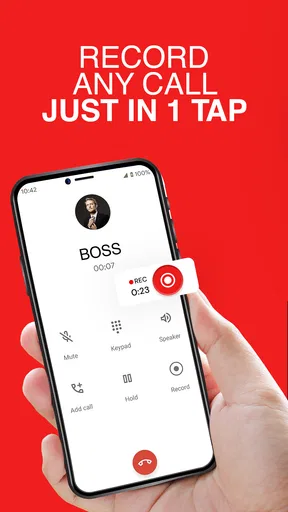
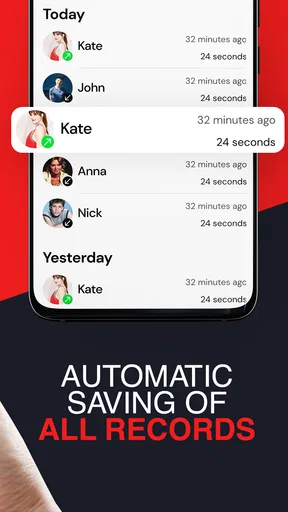
Now, let's dive into what makes this app shine. One of the standout features is its ability to automatically record every call. You don’t have to manually start recording each time, which is a huge plus if you’re forgetful like me. You can, of course, choose to record only specific calls if you prefer.
That convenience comes with a trade-off: automatic capture can collect calls you never intended to keep. I would think carefully about whether an always-on approach suits my routine, and I would review saved audio regularly rather than assume that every recording deserves a permanent place. When I only need a record of occasional work conversations, a selective workflow is easier to manage and less intrusive than collecting every call.
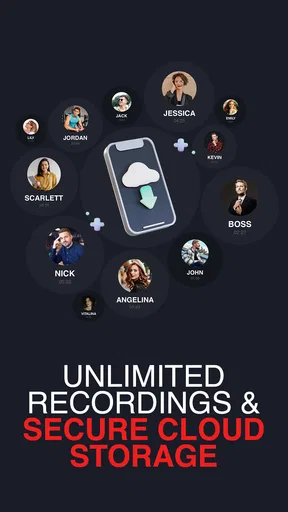
Another cool feature is the ability to organize your recordings. The app lets you sort and categorize calls, so you can easily find that important conversation when you need it. Plus, you can sync your recordings with cloud services like Google Drive or Dropbox, which is super handy for ensuring you don’t lose any critical data.
Cloud storage can make a recording available beyond one phone, but it also means thinking about which account holds it and who can access that account. I would use a clearly named folder, avoid sharing it broadly, and confirm that the file is actually there before deleting a local copy. For a conversation that is private or temporary, keeping it off shared cloud storage may be the more sensible option.
Motor, sensory, and situational access
The one-tap idea is useful in situations where a person may not be able to manage several controls while handling a call. Automatic recording may also reduce the need to remember a precise moment to start capturing audio. Those are meaningful conveniences for someone with limited dexterity, fatigue, or difficulty switching between tasks, though they do not prove that every part of the app is accessible to every user.
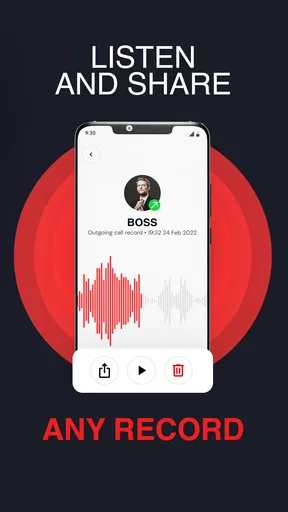
For sensory access, saved audio offers a way to replay spoken details at a pace that suits the listener. That can help when a call includes names, instructions, or several dates that are difficult to retain after hearing them once. It does not remove the need to listen to the recording, however; anyone who needs text, captions, or a transcript should not assume those are part of this app. A written follow-up may be a better companion when spoken audio alone is not enough.
In an ordinary day, imagine arranging a repair by phone while also trying to manage work. If recording is lawful and the other person is comfortable with it, keeping the conversation could help you check the agreed arrival window later instead of relying on memory. I would still write the key appointment details in a calendar, because a recording is slower to search than a short note when you are standing at the door waiting.
Privacy and Security
Of course, recording calls comes with its own set of privacy concerns. Rest assured, Call Recorder Pro takes this seriously. The app provides options to password-protect your recordings, adding an extra layer of security. It’s great to see that the developers have considered user privacy, making it a reliable option for sensitive conversations.
I would treat password protection as one part of a privacy routine rather than a reason to record without caution. Think about who can unlock the phone, where cloud copies may be stored, and how long a recording needs to remain available. If a file contains account details, health information, or another person’s private circumstances, keeping it only as long as necessary is a sensible safeguard.
Usability and Performance
Speaking of reliability, the app performs seamlessly. During my time using it, I encountered no glitches or crashes, which is always a relief. The recording quality is superb, with both ends of the call captured clearly. Whether you’re using a high-end device or a budget model, the performance remains consistent.
Call recording can depend on the phone and the way calls are handled, so I would not assume a result from one device guarantees the same result on another. The safest check is a brief test with someone you trust: listen back to confirm both voices are understandable, then repeat the test in the type of call you plan to record. If a recording is muffled or incomplete, do not rely on it for an important commitment.
The app is free to install and is rated for Everyone. Its current version is 5.68, and the minimum operating system is version 9. In-app purchases range from $1.99 to $39.99 per item, so I would check the purchase screen carefully before choosing anything paid. A free download does not mean every option necessarily comes without a cost.
Customization and User Experience
Customization is another area where this app scores big. You can tweak settings to suit your preferences, like choosing the audio format or adjusting the recording volume. The user experience is further enhanced by the absence of annoying ads, which is a refreshing change from many free apps out there.
Those settings are worth approaching with a purpose rather than changing them all at once. If storage space is a concern, consider whether you need to keep every recording and make a habit of removing files that no longer serve a use. If you expect to share a file with another device or service, consistency in how you name and organize recordings can save time later. Before an important call, I would avoid experimenting with settings; test any change on an ordinary conversation first.
Where it fits among call-recording options
Compared with relying on memory, Call Recorder Pro can preserve the exact wording of a conversation for later review. Compared with taking notes during a call, it lets you focus more on listening, but it takes longer to revisit and requires more care with private information. A phone’s built-in call tools, where available, may be simpler for someone who only needs occasional recordings; a dedicated recorder is more compelling when repeated capture and organizing calls are part of a regular routine.
There is no universal winner among these approaches. If you only need a date or a delivery address, a quick note is often faster and safer. If tone and wording matter, audio may be more useful. If you need searchable text or have difficulty listening to recordings, choose a tool that explicitly provides the format you need rather than assuming an audio archive will solve that problem.
Remaining barriers and who should skip it
The main friction is not just learning the interface; it is deciding when recording is appropriate and managing the files afterward. People who want a set-and-forget recorder may find automatic capture too broad, while people who require guaranteed recording behavior across every call should test their particular device before relying on it. Those who need transcripts, hands-free control, or a highly specific accessibility feature should verify that their needs are met before making this their main solution.
I would also skip it if you have no clear reason to keep call audio, or if you are uncomfortable maintaining a private archive. Recordings can accumulate quickly in everyday use, and a file that seems useful today may become unnecessary later. A short written note, a calendar entry, or asking the other person to send the details in a message can be a cleaner answer for routine arrangements.
Customization and User Experience
Customization is another area where this app scores big. You can tweak settings to suit your preferences, like choosing the audio format or adjusting the recording volume. The user experience is further enhanced by the absence of annoying ads, which is a refreshing change from many free apps out there.
Wrapping It Up
All in all, Call Recorder Pro is a solid choice for anyone in need of a reliable call recording app. Its combination of ease of use, robust features, and focus on security makes it stand out in a crowded market. Whether you're using it for business or personal reasons, it’s a tool that can undoubtedly make your life easier.
So, if you’re on the lookout for a call recorder that ticks all the right boxes, give this one a shot. You might just find it becomes an indispensable part of your smartphone toolkit.
My inclusive verdict is that this app makes most sense for someone who can comfortably manage audio files and has a clear, lawful reason to keep particular conversations. Its simple recording approach may reduce effort for some people, but ease of recording is only one part of access: finding, replaying, securing, and eventually deleting audio all matter too. I would try it with a low-risk call, check the result, and decide whether the workflow fits my device and needs before trusting it with anything important.
Pros
- Easy-to-use interface for quick setup.
- High-quality audio recordings.
- Supports multiple file formats.
- Automatic call recording feature.
- Secure cloud storage integration.
Cons
- Limited free version features.
- May not work on all devices.
- Potential privacy concerns.
- Ads in free version can be intrusive.
- Requires ongoing permissions access.
FAQs for Call Recorder Pro
Is Call Recorder Pro compatible with all devices?
Call Recorder Pro is designed to work with most Android and iOS devices. However, functionality can vary depending on your specific device model and operating system version. It's recommended to check the app's compatibility in the app store or on the developer's website before downloading to ensure it meets your needs.
Does Call Recorder Pro require an internet connection?
No, Call Recorder Pro does not require an internet connection for basic recording functions. However, internet access may be needed for certain features like cloud storage backup or software updates. Always check the app's requirements to understand what features may need connectivity.
Is my recorded data secure with Call Recorder Pro?
Call Recorder Pro prioritizes user privacy and security. The app typically uses encryption to protect your recordings. Additionally, you can opt to store recordings locally or use cloud services for additional security. Always review the app’s privacy policy to understand how your data is handled.
Can Call Recorder Pro record both incoming and outgoing calls?
Yes, Call Recorder Pro is designed to record both incoming and outgoing calls. However, due to varying local laws and device capabilities, this feature may not be available on all devices or in all regions. Ensure you comply with local regulations regarding call recording.
How can I access and manage my recordings in Call Recorder Pro?
Managing your recordings in Call Recorder Pro is straightforward. The app typically offers an intuitive interface where you can play, delete, or share recordings directly within the app. Some versions may also provide options to organize recordings by date, contact, or custom labels for easy access.


